Convert your file
.splat, .ksplat and .spz files need to be converted to .sog or .ply before you upload them. We recommend .sog: it is much smaller than .ply, so it uploads and loads faster and plays more smoothly on your product pages.
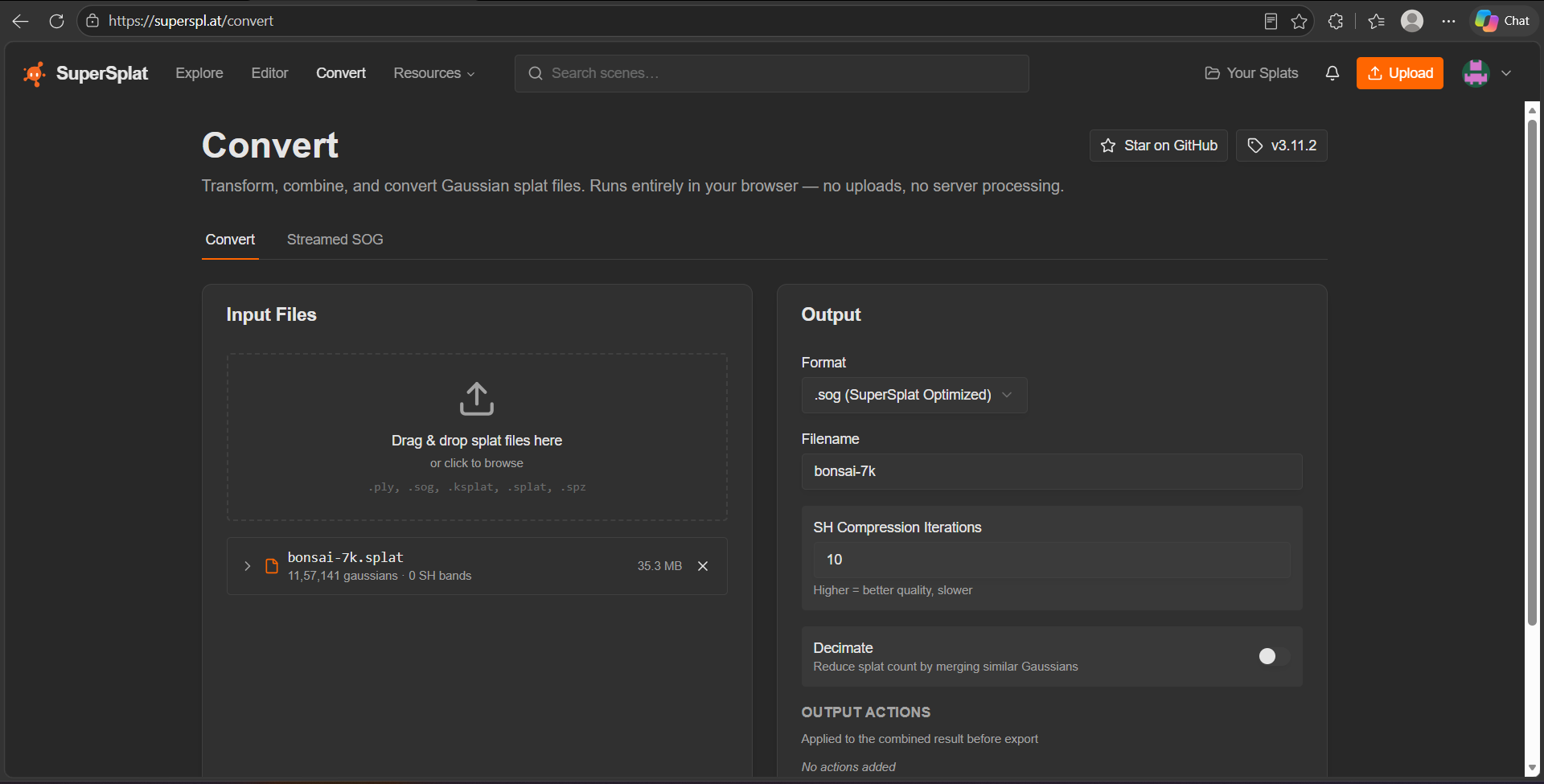
Use the free SuperSplat converter: superspl.at/convert. It runs in your browser, so your file is not uploaded anywhere.
Steps
- Open superspl.at/convert. You can also reach it from the dashboard: click Supported Extensions under Upload Splat, then Convert your file.
- Under Input Files, drag and drop your
.splat,.ksplator.spzfile, or click to browse. - Under Output, set Format to .sog (SuperSplat Optimized).
- Check the Filename. The other options can stay as they are.
- Scroll down, convert the file and download the
.sog. - Put the
.sogfile in a.zip. - Upload the ZIP.
Tip
The same link is behind the info icon next to the dashboard subtitle, Add 3D Gaussian Splats to your product pages...
See Supported formats for what a ZIP can hold.